New Year, New Desktop
January 8, 2026
A new year, a new computer, and a new experience, building my first desktop. It’s only been a year since I got a Framework laptop which is already sufficent for my current needs so there wasn’t any good reason to get a new computer. While most think GPUs are only good for gaming and more recently for running your own local LLM, it can be used for more interesting things, compute such as numerical analysis and simulations. Not that I’m sufficiently motivated to do so myself. Perhaps I’ll write my final undergraduate Math paper on numerical analysis and simulations, but only time will tell.
2026 is not the most ideal year to build a desktop, especially due to the rising RAM costs we have been experiencing since late September:
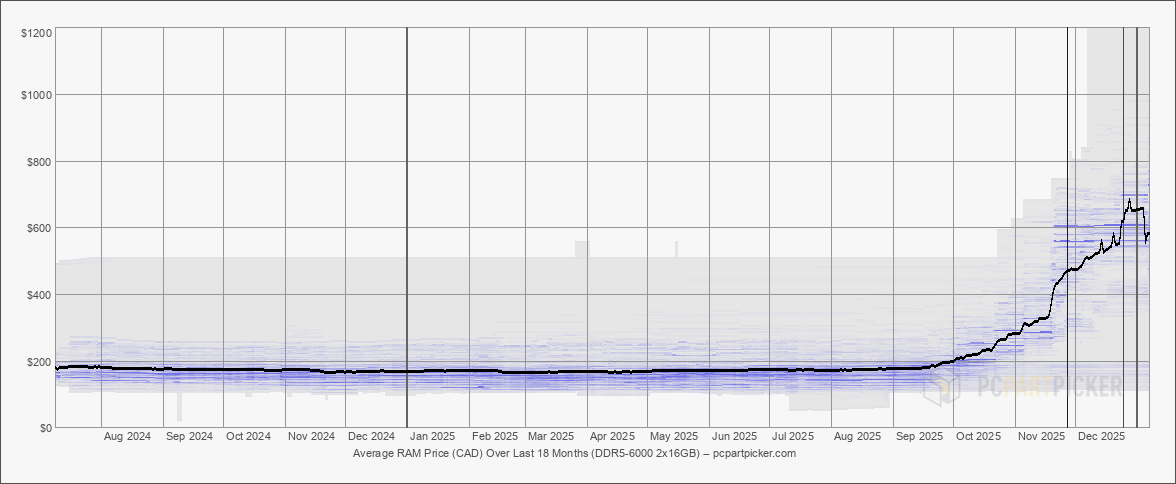
Source: PC Parts - Amount in Canadian Dollars
But alas, I already started buying PC components in late summer so I decided to take the hit and buy one of the few last batches (at least in 2025) of RAM that Crucial will ever provide as the parent company Micron decided to exit the market to focus on building HBM for the AI & Datacenter market. If you receive RAM from Crucial in February, you truly have the last few batches that’ll ever be manufactured.
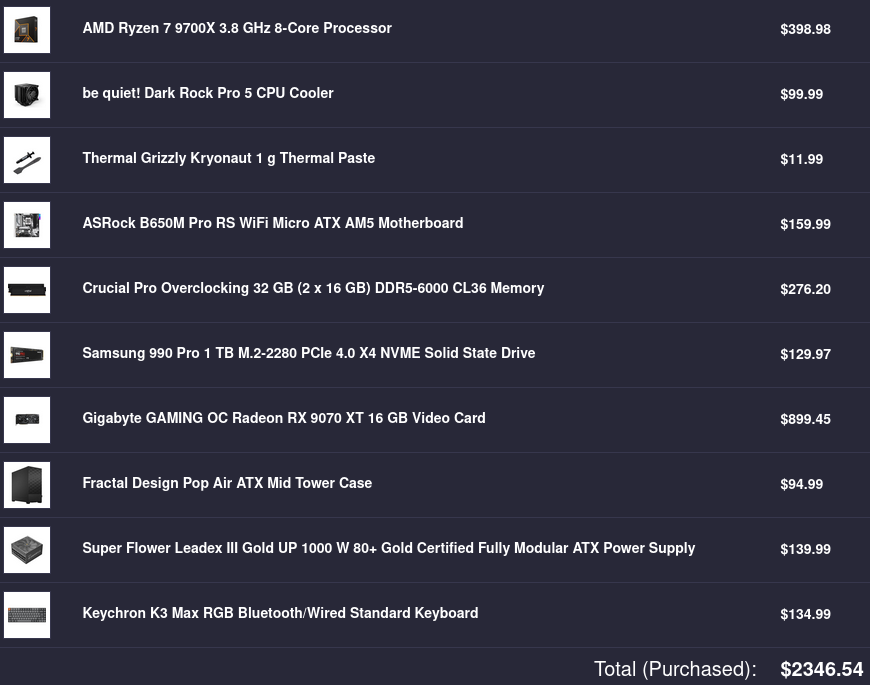
Not including our 13% tax, the total came up to \$2346.54 CAD, an enormous sum for a student like myself. I did get receive an employee discount of \$134.92 CAD which did help but the amount was way less than what I have initially expected (i.e. $300 USD).
As this was my first build, I ended up falling for a lot of rookie mistakes which includes:
- Forgetting to peel off the sticker from the CPU cooler before placing it on top of the thermal paste
- Having my screwdriver shaft fall down inside a narrow part of the PC case which caused me needing to unscrew the fans built-into the case to remove it
- my screwdriver has a detachable shaft to make the driver shorter or taller
- Downloading the wrong bios: B650M RS PRO v.s. B650 RS PRO WIFI
- Plugging the display cable from the motherboard IO instead of the GPU IO
- Not plugging enough PCI-E cables between the GPU and Power Supply
- This explained why the GPU was not being detected originally and would have been missed if I didn’t try to perform some benchmarking
Specs and Performance
$ fastfetch
             .',;::::;,'.                 zaku@fedora
         .';:cccccccccccc:;,.             -----------
      .;cccccccccccccccccccccc;.          OS: Fedora Linux 43 (Workstation Edition) x86_64
    .:cccccccccccccccccccccccccc:.        Host: B650M Pro RS WiFi
  .;ccccccccccccc;.:dddl:.;ccccccc;.      Kernel: Linux 6.17.12-300.fc43.x86_64
 .:ccccccccccccc;OWMKOOXMWd;ccccccc:.     Uptime: 2 hours, 2 mins
.:ccccccccccccc;KMMc;cc;xMMc;ccccccc:.    Packages: 2517 (rpm)
,cccccccccccccc;MMM.;cc;;WW:;cccccccc,    Shell: bash 5.3.0
:cccccccccccccc;MMM.;cccccccccccccccc:    Display (BenQ GW2480): 1920x1080 @ 60 Hz in 24" [External]
:ccccccc;oxOOOo;MMM000k.;cccccccccccc:    DE: GNOME 49.2
cccccc;0MMKxdd:;MMMkddc.;cccccccccccc;    WM: Mutter (Wayland)
ccccc;XMO';cccc;MMM.;cccccccccccccccc'    WM Theme: Adwaita
ccccc;MMo;ccccc;MMW.;ccccccccccccccc;     Theme: Adwaita [GTK2/3/4]
ccccc;0MNc.ccc.xMMd;ccccccccccccccc;      Icons: Adwaita [GTK2/3/4]
cccccc;dNMWXXXWM0:;cccccccccccccc:,       Font: Adwaita Sans (11pt) [GTK2/3/4]
cccccccc;.:odl:.;cccccccccccccc:,.        Cursor: Adwaita (24px)
ccccccccccccccccccccccccccccc:'.          Terminal: Ptyxis 49.2
:ccccccccccccccccccccccc:;,..             Terminal Font: Adwaita Mono (11pt)
 ':cccccccccccccccc::;,.                  CPU: AMD Ryzen 7 9700X (16) @ 5.58 GHz
                                          GPU: AMD Radeon RX 9070 XT [Discrete]
                                          Memory: 3.67 GiB / 30.92 GiB (12%)
                                          Swap: 0 B / 8.00 GiB (0%)
                                          Disk (/): 17.12 GiB / 928.91 GiB (2%) - btrfs
                                          Local IP (wlp6s0):
                                          Locale: fr_FR.UTF-8
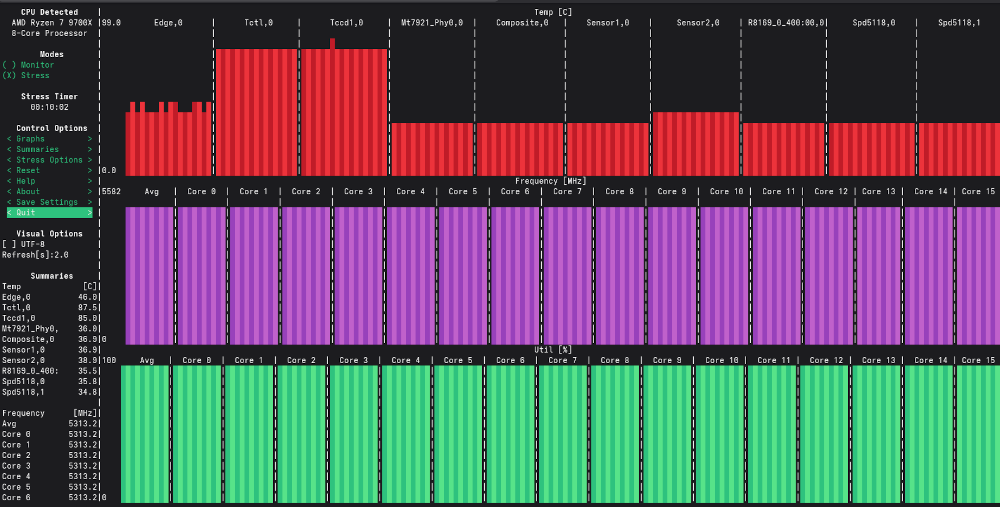
s-tui output - don't bother straining your eyes to read the values
The readings below are just a snapshot @ 11:37 ran on a different date from the image above:
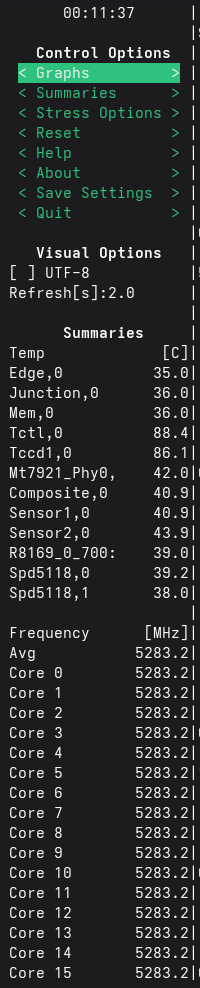
- Tctl: 88.4
- Tccd: 86.1°C
- Core Frequency Avg: 5283.2MHz
Based on running s-tui CPU stress test for 10+ minutes, the system maintained temperatures below 90°C from what I have observed (though I haven’t kept an eye on it for all 10+ minutes) indicating the cooling and thermal paste appear to be working as intended. For Ryzen 7 9700X, the maximum operating temperature (Tjmax) is 95°C which my system is comfortably operating below even under sustained stress workloads. I am specifically tracking Tccd1 (the temperature associated with the physical Core Complex Die) rather than Tctl, as Tctl is a control value used for fan scaling or whatever cooling system used as stated in the K10temp Linux Kernel Driver:
Tctl is the processor temperature control value, used by the platform to
control cooling systems. Tctl is a non-physical temperature on an
arbitrary scale measured in degrees. It does _not_ represent an actual
physical temperature like die or case temperature. Instead, it specifies
the processor temperature relative to the point at which the system must
supply the maximum cooling for the processor's specified maximum case
temperature and maximum thermal power dissipation.
CCD is also another AMD terminology for Core Complex Die which you can read more about in this article or in this whitepaper. But essentially for Zen 5 architecture, you can think of a CCD as a collection of CPU cores with a shared L3 cache.
With an average clock rate of 5283.2MHz, the CPU was reaching close to its theoretical peak of 5.5GHz as expected. For context, the base clock speed is advertised to be 3.8GHz.
As the RAM was advertised to go 6000MHz (6000MT/s), I enabled EXPO (XMP) on the bios to utilise the full advertised speed instead of the default slower speed.
$ sudo dmidecode --type 17 | grep -E "Configured Memory Speed"
	Configured Memory Speed: 6000 MT/s
	Configured Memory Speed: 6000 MT/s
Here are the blender results:
| Device | Monster | Junkshop | Classroom |
| Radeon 9070xt (dGPU) | 1607.56 | 790.52 | 711.39 |
| Ryzen 7 9700X (CPU) | 173.95 | 118.89 | 87.12 |
A significant improvement compared to my Framework laptop:
| Device | Monster | Junkshop | Classroom |
| Radeon RX 7700S (dGPU) | 416.25 | 222.96 | 188.13 |
| Radeon 780M (iGPU) | 143.59 | 77.86 | 67.42 |
| Ryzen 9 7940HS (CPU) | 107.62 | 71.33 | 52.52 |
Why not X3D CPU?
The decision was mainly due to pricing, RAM prices doubled than what I allocated in my budget which I did slightly exceeded by a few Canadian dollars. An X3D chip would have costed an extra few hundred Canadian dollars and considering I do not play videogames, there was little reason to do so. With RAM prices doubling, an X3D chip would probably help alleviate the lack of memory in your system as it “hides” RAM latency due to its large L3 cache. But that is also another reason why I avoided the X3D chip which may sound counter-intuitive. With its abnormally large L3 cache for a desktop CPU, I felt that it would not be good for algorithm performance analysis as it reduces trips to the main memory which will diminish the effect of a poorly designed memory-bound algorithm.