Digital Signatures on PDF
January 17, 2026
Recently, I came across my electronic copy of my degree and transcript from several years ago and remembered that it was digitally signed. I previously wrote about how to manually verify an email signature 2 years ago and that got me thinking: how can I verify the signature of my degree and transcript to ensure that it has indeed come from my University and that it has not been tampered with?
Note: When referring to digital signatures on PDFs, I am not referring to e-signature i.e. the graphical signature that contains a name for instance
For this post, I won’t go through the nitty-gritty details this time, and instead I will use various tools to do the work for me. In other words, this is not a technical post on digital signatures.
Digitally signing documents is a brilliant idea and I wished the France Éducation International did the same for their DELF/DALF exams. They used to email PDF results of the exam till the embassy and the organization later directed test centers to prioritize in-person collection:
We used to send result certificates by email in PDF format. However, the management center at the Embassy and France Éducation international
now recommend prioritizing in-person collection to reduce the risk of fraud, which has become increasingly common.
Here’s a sample of attached to my transcript:
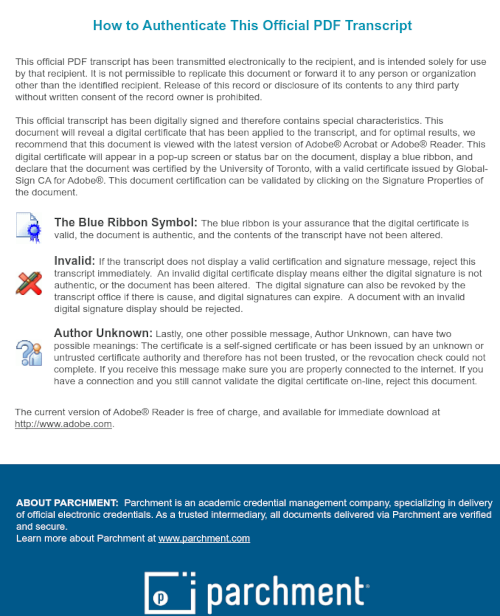
Each page also contains a footer indicating that the document is digitall signed and encourages recipients to perform their due diligence to ensure that it has not been tampered with:
THIS TRANSCRIPT HAS BEEN DIGITALLY SIGNED AND CERTIFIED BY THE UNIVERSITY OF <REDACTED>. IT IS OFFICIAL
ONLY WHEN BEARING THE BLUE RIBBON SYMBOL, AND A VALID CERTIFICATE ISSUED BY GLOBALSIGN CA FOR ADOBE
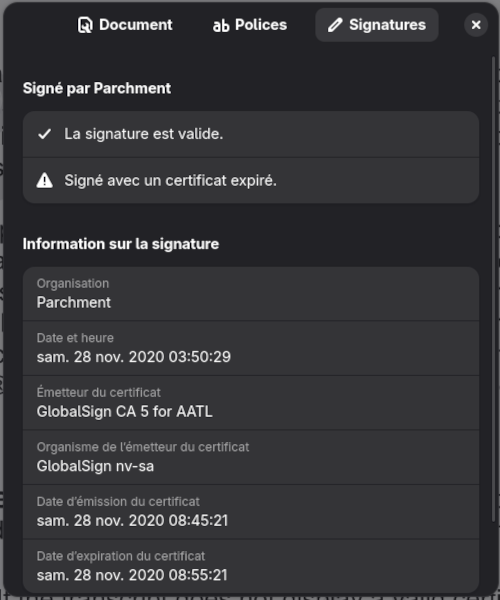
While I do not own a Windows machine to verify this through Adobe Reader, I can confirm that the document indeed display a Blue Ribbon on my work laptop. For us Linux users, there are plenty of
options to verify the authenticity of the document itself such as through GNOME Document Reader or via command-line using pdfsig:
$ pdfsig etranscript.pdf
Digital Signature Info of: etranscript.pdf
Signature #1:
  - Signature Field Name: ParchmentSig1
  - Signer Certificate Common Name: Parchment
  - Signer full Distinguished Name: CN=Parchment,O=Parchment,C=US
  - Signing Time: Nov 28 2020 03:50:29
  - Signing Hash Algorithm: SHA-256
  - Signature Type: adbe.pkcs7.detached
  - Signed Ranges: [0 - 185], [16571 - 699076]
  - Not total document signed
  - Signature Validation: Signature is Valid.
  - Certificate Validation: Certificate has Expired
However, unlike GNOME Document Reader, pdfsig does not provide when the certificate expires and whichi certificate authority issued it.
To obtain ths information, we’ll first need to extract the signature from the PDF using the -dump option:
$ pdfsig -dump ./etranscript.pdf
Dumping Signatures: 1
Signature #0 (8192 bytes) => etranscript.pdf.sig0
We can then use openssl to extract the certificates from the signature:
$ openssl pkcs7 -inform DER -in ./etranscript.pdf.sig0 -print_certs -out etranscript.pem
$ openssl x509 -in ./etranscript.pem -text -noout
Certificate:
    Data:
        Version: 3 (0x2)
        Serial Number:
            01:c8:e8:dc:70:35:44:3b:ae:fd:f2:20:5a:ce:09:b6
        Signature Algorithm: sha256WithRSAEncryption
        Issuer: C=BE, O=GlobalSign nv-sa, CN=GlobalSign CA 5 for AATL
        Validity
            Not Before: Nov 28 08:45:21 2020 GMT
            Not After : Nov 28 08:55:21 2020 GMT
        Subject: C=US, O=Parchment, CN=Parchment
        Subject Public Key Info:
            Public Key Algorithm: rsaEncryption
                Public-Key: (2048 bit)
                Modulus:
Side Note: One can observe that the certificate expired within 10 minutes of its creation and is likely to minimize potential risks.
Verify Hash of Document
From what I can observe, it seems to be a common practice to embed the digital signature directly into the document itself rather than storing it in a separate file as shown below:
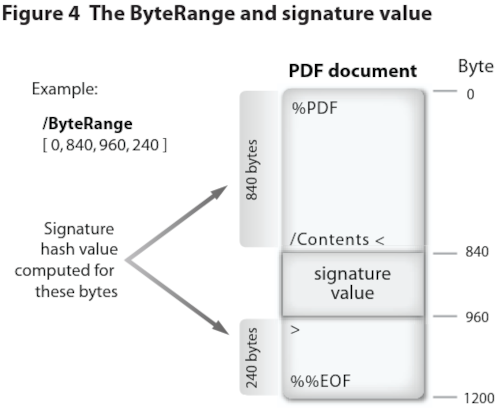
Extracted from Adobe - Digital Signatures in a PDF
During the signing process of a document, the software would typically hashes the document before using the private key of the signer to encrypt the resulting hash value. This signature is then typically provided to the receipient as a separate file. However, for PDFs that embed the signature, the process will differ as the software cannot simply just hash the document and then insert the signature arbitrarily as doing so will break the document.
Instead, the PDF will reserve a region within the document to fit the signature value and some related metadata. One such piece of metadata is the ByteRange entry to indicate exactly
what portions of the file is included in the signature as seen in the image above. For instance, ByteRange [0, 840, 960, 240] are simply pairs of offset in the file and its length:
- 0, 840:
- Offset: 0B
- Size: 840B
- 960, 240:
- Offset: 960B
- Size: 240B
In the case of my transcript, pdfsig indicated that the signed ranges of the document was: [0 - 185], [16571 - 699076].
To verify the signature indeed only verifies the indicated bytes, we can reconstruct the signed content by removing the embedded signature byte:
# Remove the digital signature from the document
dd if=./etranscript.pdf of=chunk1.bin bs=1 count=185 skip=0
dd if=etranscript.pdf of=chunk2.bin bs=1 count=682505 skip=16571
cat chunk1.bin chunk2.bin > reduced-transcript2.bin
We can now observe that approximately 37KiB of data corresponding to the unsigned content has been removed:
$ stat --printf="%s\n" etranscript.pdf
720645
$ stat --printf="%s\n" reduced-etranscript2.bin
682690
At this point, we should be able to verify the signature against the reconstructed document:
$ openssl cms -verify -binary -inform DER -in etranscript.pdf.sig0 -content reduced-etranscript2.bin -noverify | grep success
CMS Verification successful
This confirms that the signature has indeed only signed the specified bytes indicated by pdfsig. An important note, this does not
establish trust in the signer as I omitted the certificate check.
Based on my research and consulting with friends who have graduated, it does not seem my current institution will provide me a digitally signed degree when I graduate in 2027. This news is a bit disappointing
but unsurprising. Digital signed PDFs is still a piece of technology that is not widespread unlike HTTPS with their SSL/TLS certificates to cryptographically prove the identity of the webserver. With the
widespread impersonnation and fraud, I think it would be of the best interest for my institution to adopt digitally signing documents. They instead encourage employers to use AuraData which
provides risk prevention in the number one area of résumé fraud, post-secondary/professional designation education claims.
Any employer should do their due diligence and it would seem AuraData is a solution that works as evident from Case 989 where AuraData were mentioned in this tribunal case. In this case, a student fraudently stated they graduated from the university in 2015 and provided a copy of their degree which AuraData tried to verify. As this was supposedly issued in 2015, this was before Parchment Award existed and therefore probably before the university in question adopted this system. Therefore as the document was not digitally signed, AuraData did their due diligence and contacted the university to verify the student’s graduation which one can do on the university’s website for a fee of $22.50 CAD. But if the document had been digitally signed, AuraData would have been able to report to their client that the document is authentic. Of course, this is not foolproof if the student shares the same name as another graduate.
Interestingly enough, I have not been provided digitally signed letters of my employment status at the various companies I have worked at. I guess we got to make our security background check providers do something. On another note, it seems like Parchment, the provider of my digitally signed transcript and degree, is not a well liked platform. I got no complaints as I was given the two for free of charge upon graduation along with the physical copy of my degree and I never had to use their service to submit my documents to other institutions.